
Home / How It Works
Install once, then audit pages, check links and research competitor ads from a side panel in your browser. Here’s the full walkthrough.
Click “Add to Chrome”, confirm, and pin the crosshair icon to your toolbar. No account, no credit card and no setup wizard.
Open a competitor’s homepage, a landing page you’re auditing, or a Google results page for the keyword you’re targeting. Ads Sniper reads the page you’re already on.
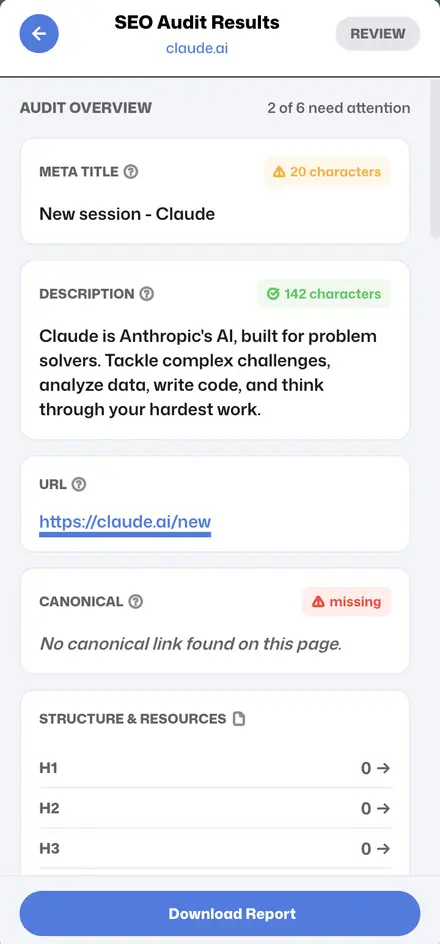
Click the Ads Sniper icon in your toolbar to open the Chrome side panel. Pick SEO Audit, Link Checker, Ad Research or SERP Analysis.
Spot missing tags, dead links, competitor ad angles and ranking gaps. Export to CSV or Markdown and drop it straight into a client brief.
Analysis runs in your browser, not on our servers.
Your browsing and research stay on your machine.
Runs in under 200 ms without slowing pages down.
Pin the icon from the puzzle-piece menu, then click it on any page to open the side panel.
Yes — run SERP Analysis on any Google results page to see rankings and SERP features.
No. Ads come from Google’s public Ads Transparency Center and the Meta Ad Library.
Ads Sniper is designed to fit into the way you already browse. Once it is pinned to your toolbar, any page becomes a starting point for SEO, link, ad or SERP research.
Open the page, run the SEO Audit, then the Link Checker. Fix the flagged meta tags, headings and links, and export the results as a checklist for your developer or client.
Visit a competitor’s site and open the Google Ads and Meta Ad Library tools to see the campaigns they run. Then check their key landing pages with the SEO Audit.
Search your target keyword on Google and run SERP Analysis. Note the intent, the SERP features and the pages that rank, then plan content that covers what they miss.
Analysis runs locally in your browser and the extension is Manifest V3 compliant. Your browsing and research are not collected or sent to our servers.