
Check the meta title, description, canonical, headings, schema and Open Graph tags of any web page, straight from the Chrome side panel.
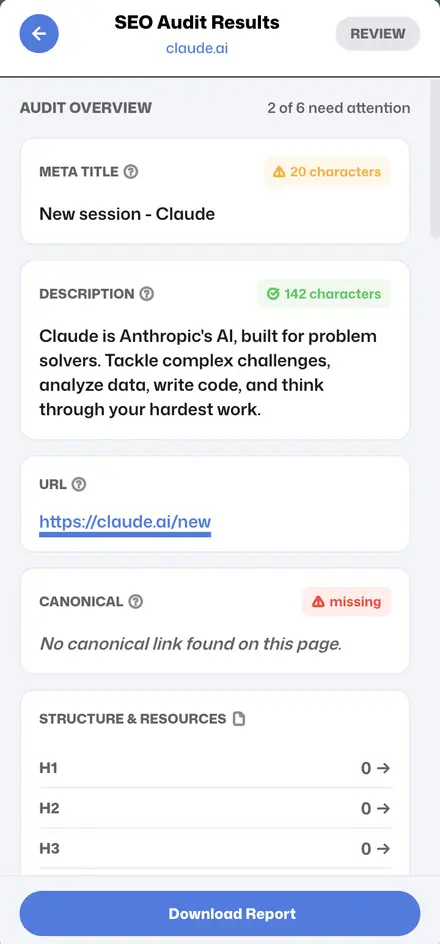
Flags titles that are too short or too long for search results.
Shows the description and its length so you can tune click-through.
Catches missing or conflicting canonicals before they split rankings.
Counts every heading level and flags a missing H1 or skipped levels.
Lists the structured data types found on the page.
Checks social share tags, viewport and robots directives.
Your own site, a client’s or a competitor’s.
Open Ads Sniper in the side panel and run the audit.
Work through the flagged items, then download the report.
Yes. Install Ads Sniper and run audits with no account or credit card.
It audits the page you have open, so you can check any URL instantly without a site crawl.
Yes — use Download Report to export the audit.
An on-page SEO audit reviews the elements on a single URL that help search engines understand and rank it. Small mistakes such as a missing H1, a duplicate title or a wrong canonical can quietly cost rankings, and they are easy to miss without a checker.
The title tag is one of the strongest on-page signals, and the meta description shapes click-through from the results page. Ads Sniper shows both with their length so you can keep them within the space search results display.
A missing or conflicting canonical can split ranking signals between duplicate URLs, and a stray noindex can remove a page from search entirely. The audit surfaces both so you catch them before they cause damage.
A clear heading hierarchy helps readers and search engines follow a page. The audit counts every heading level and flags a missing H1 or skipped levels.
Structured data can make a page eligible for rich results, and Open Graph tags control how it looks when shared on social media. Ads Sniper lists the schema types and social tags it finds on the page.
Use the free SEO audit extension on your own pages, client sites and competitor pages to see exactly what is in place and what is missing.
Free SEO, link, ad and SERP research in one Chrome extension.