Home / Tools
Five tools in one extension: audit pages, check links, see competitor Google and Meta ads, and analyze search results — all from the Chrome side panel.
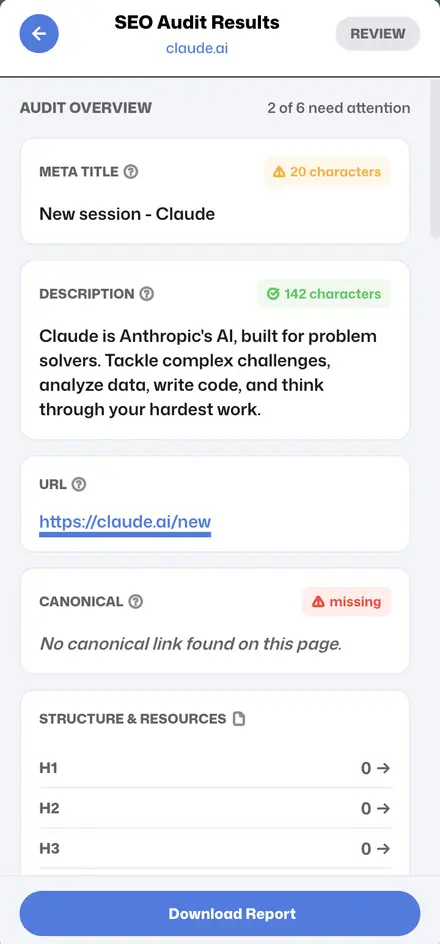
Meta title, description, canonical, headings, schema and Open Graph — checked in seconds.
Find 404s and redirect chains on any page, highlighted right where they sit.
See any competitor’s live search, display and video ads and copy their ad text.
Browse a competitor’s active image, video and carousel ads with their copy.
Rankings, SERP features, AI search previews and shopping results for any query.
No account, no credit card. Works in Chrome, Edge and Brave.
Fix a page’s meta tags, headings or canonical
Find 404 errors and redirect chains
See what a competitor runs on Google Ads
See a competitor’s Facebook & Instagram ads
Understand who ranks for a keyword and why
Free SEO tools are easy to find, but switching between five websites to research one page is slow. Ads Sniper bundles the tools SEO specialists, PPC managers and agencies use every day into a single lightweight extension that opens beside the page you are reviewing.
Use the SEO Audit to check meta tags, canonicals, headings and structured data, and the Link Checker to find broken links and redirect chains. Together they cover the on-page issues that most often hold a page back in search.
The Google Ads Transparency and Meta Ad Library tools show the ads any brand is running right now. Use them to build swipe files, benchmark offers and spot the messages competitors keep spending money on.
SERP Analysis reads organic rankings, SERP features, AI search previews and shopping results for any query, so you can match search intent and find the gaps the current results leave open.
Every tool works from the same Chrome side panel, with no sign-up, no credit card and no data sent to our servers. Results can be exported to CSV or Markdown for reports and client briefs.
See the full walkthrough, from install to your first report.